
TL;DR
Running databases on Kubernetes is no longer the scary part. Running them well in production is.
OpenEverest gives platform teams a control plane to provision and operate MySQL, PostgreSQL, and MongoDB on Kubernetes using operators, while keeping the deployment portable across clouds and on-prem environments. You still own your infrastructure choices, but you avoid rebuilding every Day 2 workflow from scratch.
This article walks through a realistic setup and operations flow, including install, provisioning, backups, PITR, monitoring, RBAC, and failure-mode thinking.
Table of contents
Open Table of contents
- Why This Problem Still Hurts in 2026
- What OpenEverest Actually Adds
- Real-Life Example: A Platform Team Under Pressure
- Implementation Steps
- How This Helps on Day 2
- Tradeoffs and Limitations You Should Know
- Practical Takeaways
- Conclusion
- Further Reading
- Related Topics You Might Want Next
- Practical Next Steps
Why This Problem Still Hurts in 2026
Most teams are already comfortable shipping stateless services on Kubernetes. Databases are where the smooth story gets messy.
Day 1 is usually manageable:
- Spin up a cluster
- Install an operator
- Create one database
Day 2 is where the real bill arrives:
- Backup and restore strategy
- Point-in-time recovery (PITR)
- Access control and namespace boundaries
- Version and operator upgrades
- Exposure and network policy hardening
- Monitoring that is actually useful at 2:47 AM
Cloud DBaaS can hide a lot of this. It can also hardwire you into one provider’s APIs, pricing model, and operational constraints. OpenEverest sits in the middle: DBaaS-like workflows, but on infrastructure you control.
What OpenEverest Actually Adds
From the official docs, OpenEverest is positioned as an open source platform for automated database provisioning and management on Kubernetes.
In practical terms, it gives you:
- A UI and API to manage database clusters
- Integration with supported operators for PostgreSQL, MySQL (PXC), and MongoDB
- Backup, restore, and PITR workflows
- Namespace-aware operations and RBAC policies
- PMM integration for monitoring
- CRD-driven automation for platform teams who prefer GitOps-style control
As of the local docs snapshot in this repository, OpenEverest 1.14.0 was released on March 10, 2026, with chart migration to openeverest/helm-charts and updated operator support.
Real-Life Example: A Platform Team Under Pressure
Let’s use a realistic (fictional) case.
Your company, BananaRama, runs:
- Checkout APIs on Kubernetes
- Internal admin services on Kubernetes
- Event processing on Kubernetes
Data requirements:
- PostgreSQL for transactional checkout data
- Strict backup requirements
- Recovery point objective measured in minutes, not hours
- Different access levels for platform admins and product teams
- No dependency on a single cloud database product
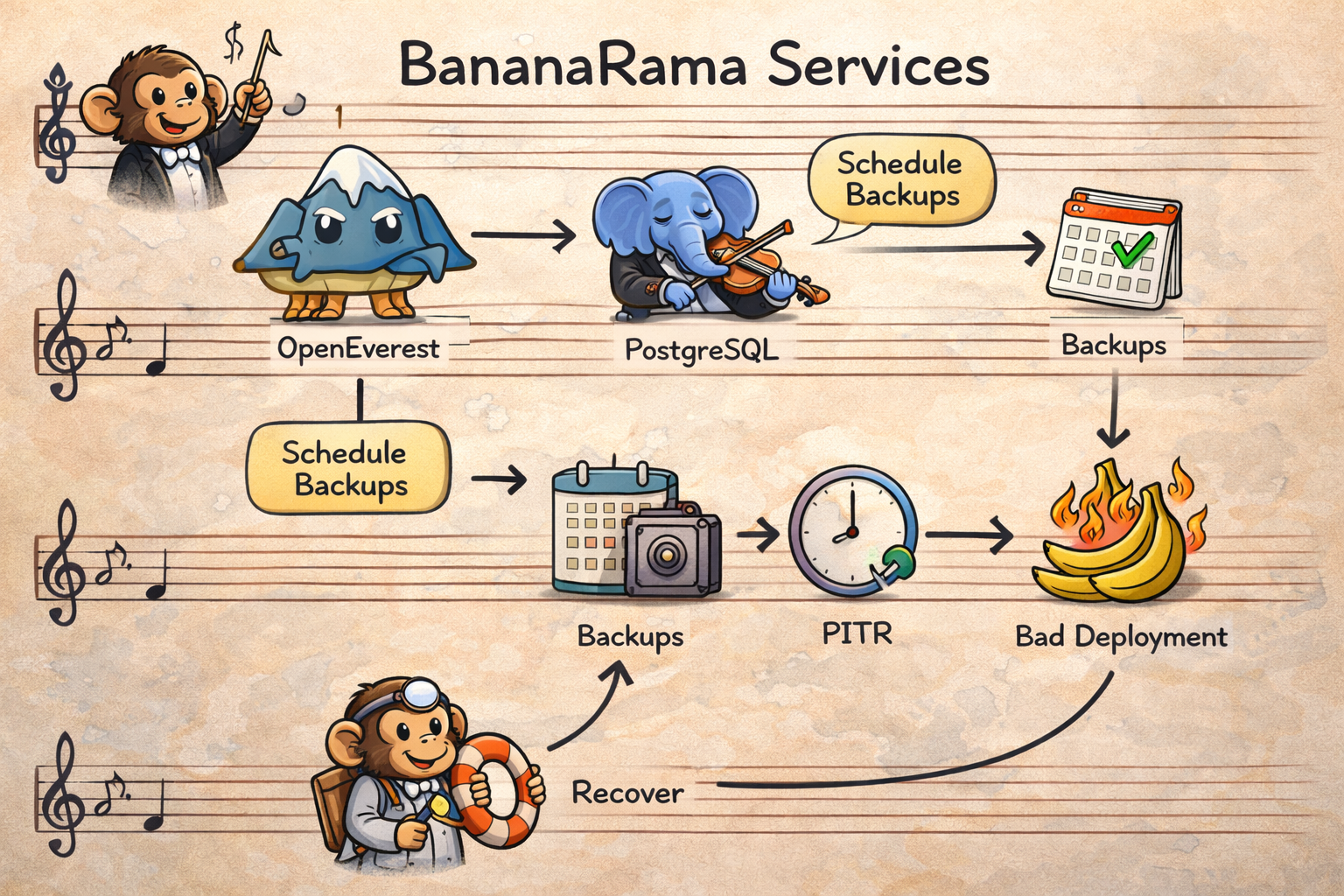
The team picks OpenEverest to standardize DB operations across clusters in AWS and on-prem environments.
Implementation Steps
Step 1: Install OpenEverest
You can install via Helm directly (or use everestctl, which uses Helm under the hood in recent versions).
helm repo add openeverest https://openeverest.github.io/helm-charts/
helm repo update

helm install everest openeverest/openeverest \
  --namespace everest-system \
  --create-namespace
Then expose the service for UI/API access (for quick lab access, port-forward is fine):
kubectl port-forward svc/everest 8080:8080 -n everest-systemAt this point, your control plane exists, but you still need namespaces, engines, and policies to make it production-safe.
Step 2: Prepare Database Namespaces and Operator Scope
One useful operational pattern is to separate environments early (dev, staging, prod) and keep permissions scoped.
Example:
everestctl namespaces add prod --operator.postgresql=true --operator.mongodb=false --operator.xtradb-cluster=falseThat gives your prod namespace only the operator stack you actually need there.
Small detail, big impact: this reduces “everything everywhere” drift and lowers blast radius.
Step 3: Provision a Production PostgreSQL Cluster with Backups + PITR
OpenEverest can be driven from UI, API, or CRDs. For repeatability, here’s a CRD-based example inspired by the official DatabaseCluster docs:
apiVersion: everest.percona.com/v1alpha1
kind: DatabaseCluster
metadata:
  name: checkout-pg-prod
  labels:
    clusterName: checkout-pg-prod
spec:
  backup:
    pitr:
      enabled: true
      backupStorageName: s3-backups-prod
    schedules:
      - name: nightly-backup
        enabled: true
        backupStorageName: s3-backups-prod
        schedule: "0 2 * * *"
  engine:
    type: postgresql
    version: "17.4"
    replicas: 3
    resources:
      cpu: "4"
      memory: 8G
    storage:
      class: gp3
      size: 200Gi
    userSecretsName: everest-secrets-checkout-pg-prod
  proxy:
    type: pgbouncer
    replicas: 2
    expose:
      type: internal
  monitoring:
    resources: {}
Apply:
kubectl apply -f checkout-pg-prod.yaml -n prodNow you have:
- Multi-replica PostgreSQL
- Scheduled backups
- PITR enabled
- Connection pooling via PgBouncer
Step 4: Add Monitoring and API Automation
OpenEverest integrates with PMM (currently PMM v2.x in the docs), so database teams can monitor slow queries and cluster health without building another custom monitoring sidecar maze.
For automation, grab a JWT from the API and drive workflows from your internal platform tooling:
curl --location -s 'http://127.0.0.1:8080/v1/session' \
  --header 'Content-Type: application/json' \
  --data '{"username":"admin","password":"<YOUR_PASSWORD>"}' | jq -r .token
This is where teams usually connect OpenEverest to:
- Internal developer portals
- CI/CD automation jobs
- Guardrail scripts for policy checks
Step 5: Enforce RBAC Before Everyone Is “Temporarily Admin”
By default, RBAC is disabled. In real environments, enable it early.
Minimal activation example:
apiVersion: v1
kind: ConfigMap
metadata:
  name: everest-rbac
  namespace: everest-system
data:
  enabled: "true"
  policy.csv: |
    g, platform-admin, role:admin
Then evolve policies by namespace and resource type so product teams can run their DB lifecycle without owning platform-wide settings.
How This Helps on Day 2
Back to BananaRama.
One Friday night deploy introduces a query regression in checkout. CPU spikes. Latency climbs. Then a monkey-error update corrupts part of a pricing table.
Without a platform: pager storm, ad hoc scripts, and five Slack channels debating restore strategy.
With OpenEverest patterns already in place:
- PMM dashboards reveal the query bottleneck fast.
- Team scales resources horizontally and vertically from the cluster management workflow.
- PITR restores to the correct timestamp after the bad change.
- RBAC keeps incident actions limited to the right namespace and team scope.
You do not magically eliminate incidents. You make incident response more deterministic.
Tradeoffs and Limitations You Should Know
OpenEverest is strong, but not magic. A few constraints from the docs are worth planning around:
-
Air-gapped environments are not fully supported yet. Why: current install/upgrade workflows assume access to external artifacts (for example Helm repositories and release binaries), and OpenEverest docs explicitly mark full air-gapped support as not available yet. What this means in practice: if your cluster cannot pull images/charts/binaries from approved external sources, installation and lifecycle operations become fragile unless you build and maintain your own mirrored supply chain.
-
Local Kubernetes setups (kind/minikube/k3d) may hit networking issues. Why: the platform is tested and certified mostly on managed cloud Kubernetes (EKS, GKE, OpenShift), while local clusters often behave differently for service exposure, DNS, storage classes, and load balancer behavior. What this means in practice: great for demos, risky for confidence testing. Use managed environments for staging/production validation.
-
PMM integration is currently centered on PMM v2.x. Why: OpenEverest ships monitoring integration against PMM v2 behavior today, and PMM v3 support is documented as planned. What this means in practice: if your observability stack is standardized on PMM v3-only features, plan a compatibility check before rollout.
-
Some advanced capabilities are intentionally engine-specific. Why: features like Split-Horizon DNS and MongoDB sharding depend on database-engine internals and operator capabilities, so OpenEverest cannot expose a perfectly uniform behavior across all engines. What this means in practice: design your platform contracts per engine, not as a single “one policy fits all databases” abstraction.
-
Manual password changes for DB admin users can break cluster consistency. Why: OpenEverest and operators rely on Kubernetes secrets as the source of truth. Changing root/operator/monitor credentials directly inside the database can desynchronize the live credentials from the secret state. What this means in practice: always rotate credentials through OpenEverest-supported workflows, not direct SQL/admin shell changes.
The good news is these are documented and predictable. The bad news is you still need operational discipline.
Practical Takeaways
- OpenEverest is a solid way to build an internal DB platform on Kubernetes without locking into one cloud DBaaS.
- Treat it as a control plane, not a silver bullet. You still need SRE hygiene, quota policies, and runbooks.
- Use CRDs and API where repeatability matters; use UI where speed of onboarding matters.
- Enable backup + PITR + RBAC early. Retrofitting security and recovery later is expensive.
Conclusion
If your platform strategy is “Kubernetes everywhere,” then database operations need the same level of consistency as app deployments.
OpenEverest is interesting because it closes the gap between operator-level raw power and DBaaS-level usability. You keep portability, gain automation, and avoid building every Day 2 workflow from zero.
That is not just convenience. It is leverage.
Further Reading
- OpenEverest Quick Install
- Install OpenEverest with everestctl
- Supported Operators and Kubernetes Clusters
- Database Provisioning
- DatabaseCluster CRD Guide
- Backups and PITR
- Monitoring Endpoints
- OpenEverest API
- Known Limitations
Related Topics You Might Want Next
- Building a GitOps workflow for
DatabaseClusterresources with Argo CD or Flux - Designing namespace tenancy models for platform teams
- Cost controls for storage growth and backup retention in multi-cluster setups
Practical Next Steps
- Install OpenEverest in a non-production cluster and provision one PostgreSQL cluster via UI and one via CRD.
- Run a restore game day: simulate bad data writes and validate PITR workflow.
- Enable RBAC and remove broad admin access from day-to-day developer accounts.
- Define backup retention + storage quota policy per namespace before production rollout.